







Pay applications can feel overwhelming the first time you encounter them, but once you understand the structure, they become an excellent tool for tracking project progress and payments. Ren | Pro uses the industry-standard AIA G702 and AIA G703 pay application forms. Here’s how they work and what you, as the Owner, should expect:
G703 – The Schedule of Values (Breakdown Sheet)
Ren Pro begins by entering your base proposal into the G703 form.
This document breaks the full contract sum into the standard 16-Category Construction Division format, assigning an agreed-upon dollar value to each category of work.For each monthly pay application:
- A percentage of completion is assigned to each category.
- That percentage is multiplied by the contract amount for that line item.
- Retainage (typically 5–10%, depending on your contract) is automatically withheld from each category.
- The remaining amount is what you pay for that billing period.
Once a line item reaches 100% completion, the remaining amount due for that category will be the withheld retainage.If the contract value changes, either through an increase or decrease—those amounts are added to the appropriate category like Change Orders, keeping the breakdown accurate and up to date.
G702 – The Summary Page (Cover Sheet)
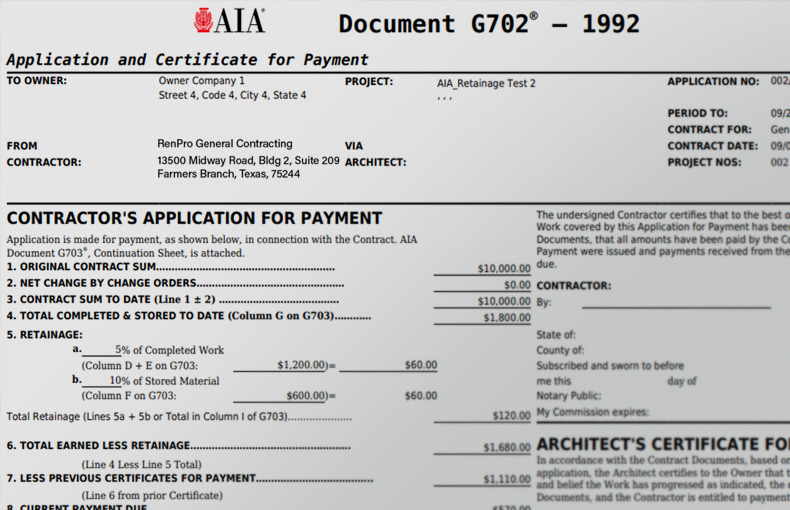
All numbers from the G703 feed into the G702 “cover page,” which provides the high-level summary. This is the page most Owners focus on.
The G702 shows:
- Original Contract Amount
- Previously Paid to Date
- Net Change by Change Orders
- Current Contract Total
- Total Completed & Stored to Date
- Retainage Amount
- Current Payment Due
This cover page is your snapshot of where the project stands financially at the moment you receive the pay app.
In Simple Terms
- G703 = the detailed spreadsheet of the job
- G702 = the summary of what you owe this billing cycle
Together, they create a transparent, standardized, and reliable method for tracking progress and payments.